What Chats is
Your team's own conversations — channels, direct messages, who can see them, and who can create them.
Chats is where your team talks to each other. Not to guests — to each other: the handover at the end of a shift, the question about room 412, the photograph of the broken fitting that saves somebody a walk.
It sits inside Treema HQ on purpose. The conversation that decides who fixes the lamp belongs next to the task about the lamp, not in a separate app somebody has to be invited to, and it stays when that person leaves.
Where it lives
Chats in the sidebar, under Team Suite. The page is the conversation list on the left and whichever conversation you have open on the right.
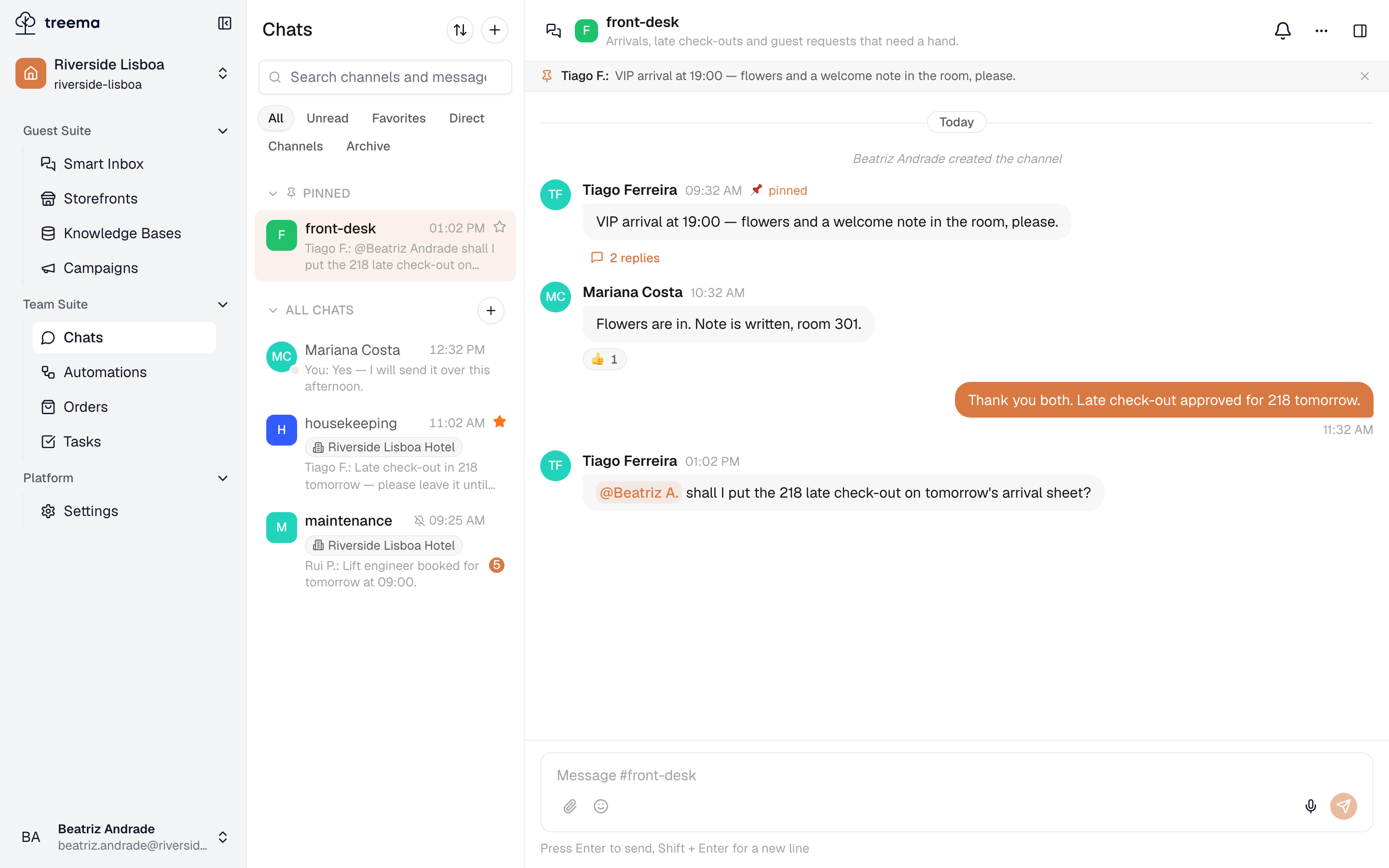
- 1
- 2
- 3
- 4
- Your conversations — channels and direct messages, most recent first
- The open conversation, and what you can do to it as a whole
- The messages themselves
- Where you write
If Chats isn't in your sidebar at all, the module is switched off for your workspace — write to support@treema.ai naming your workspace and ask for it to be turned on.
Channels and direct messages
Two kinds of conversation, and the difference is who they belong to:
- A channel is a named room for a subject or a team —
front-desk,housekeeping,lobby-refurbishment. People join and leave it; the conversation stays. - A direct message is between you and one other person. There is nothing to name and nothing to join.
Prefer a channel whenever the answer would be useful to somebody else on the team. A direct message is the right place for "are you coming in on Saturday" and the wrong place for "the lift is out" — the second one needs to survive your absence.
A channel belongs to a property, or to the whole workspace
This is chosen when the channel is created, and it decides who can see it:
- A workspace channel is for everyone in the workspace — company announcements, the group that spans buildings.
- A property channel is for the people who work at that hotel. Its rows in the list carry a chip
with the property's name, so you always know which building's
housekeepingyou are reading.
Every property starts with one channel
A new property is created with a general channel already in it, so there is somewhere to write on day one. That channel can be renamed, but it can't be deleted.
Public, private, read-only
Three settings that between them describe every channel:
| What it means | |
|---|---|
| Public | Anyone who can see that scope can find the channel and join it. |
| Private | Only its members can find it. It doesn't appear in anyone else's search. |
| Read-only | Only the channel's admins can post. Everyone else reads and reacts. |
Read-only mode suits channels that carry announcements and important information where no discussion is expected — today's arrivals, for example, or messages every member of staff has to see. A large number of replies in such channels can get in the way of the information itself.
Important: once a channel has been made public, it cannot be made private again.
If you make a private channel public, its entire message history becomes available to everyone in the workspace. This action cannot be undone. If the channel has been used to discuss personal data, complaints or sensitive matters, it is better to create a new public channel.
Who can do what
Access to Chats comes with a person's roles, per property, through three permissions:
| Permission | What it lets you do |
|---|---|
| Reads chats | Read the channels you're in, and the public ones. |
| Writes in chats | Write, react, reply, pin; start a direct message. |
| Manages channels | Create channels, and delete anybody's message. |
Every preset but Read-only holds the first two; only Hotel manager holds the third.
Inside a channel there is one more role. A channel's admin — the person who created it, plus anyone they promote — can rename it, add and remove members, archive it and change its privacy. Workspace owners and admins can do that in any channel.
So someone who only writes is not powerless: they talk, they pin what matters, they start direct messages. What they cannot do is create the rooms or delete other people's words.
What's next
- Your first message — find a channel, write in it, reply to somebody.
- Finding a conversation — the list, the filters, sorting and the search.
- Messages — reactions, threads, pins, files and voice notes.
- Channels — creating one, and everything in its settings.
- Direct messages — writing to one person, and what the dot beside a name means.
- Notifications — what reaches you, and how to make a channel quiet.
- Chats on your phone — the same conversations in the mobile app.
Guests never see any of this
Everything here is internal. Guest messages live in the Smart Inbox — writing "sorted, thanks" in a channel answers nobody outside your team.